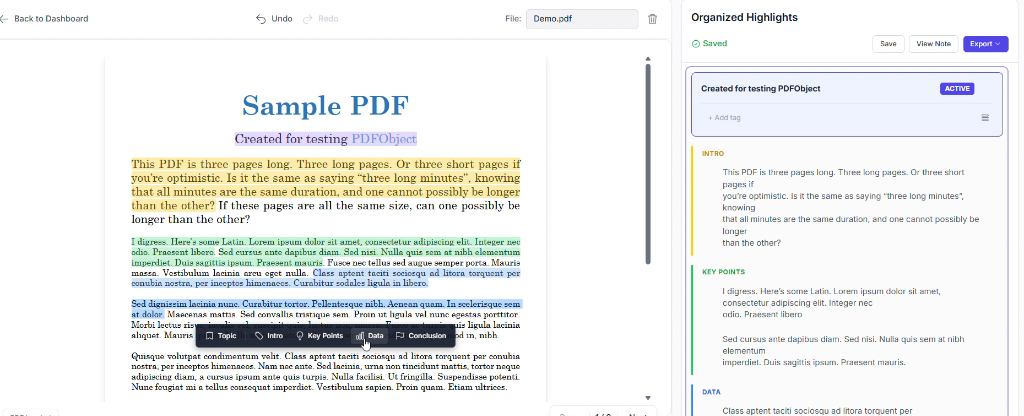
A web-based digital notebook that transforms your PDF highlights into clean, structured notes you can review or export in seconds.
Students highlight 50+ pages of notes but can't remember where key information is, waste 2–3 hours organizing before exams, and end up not reviewing highlights at all.
This is a critical bottleneck in the study process—highlighting doesn't equal understanding. I experienced this pain personally while preparing for exams and observed the same struggle in my friends, especially UPSC candidates and college peers.
No other app auto-organizes highlights into structured notes. Select categories directly—no color memorization needed.
Get ready-to-review study guides in DOCX/PDF format with headers, table of contents, and proper formatting.
Works seamlessly without internet, syncs when reconnected—critical for students with unreliable connectivity.
Jump back to any previous topic and append new highlights without creating duplicates.
Initial color-coding system required users to remember which color mapped to which category—cognitively taxing and unintuitive.
Switched to fixed category assignment. Users select category names directly (dropdown) instead of colors. App auto-assigns colors.
Export buttons buried at bottom, no way to edit categories, organized highlights panel hidden below fold, no mobile right-click.
Reorganized with sticky bottom nav, "Activate Topic" button for appending highlights, editable category names, click-to-highlight menu on mobile.
Loading entire PDFs caused 5–10 second startup, high memory on mobile, lost highlights on refresh.
Lazy-loading pages on scroll, dual-layer persistence (localStorage + backend), Service Worker for offline sync.
Designing for desktop first and adapting to mobile later caused weeks of rework. Constraint drives innovation—design for mobile from Day 1.
I spent 2 weeks optimizing the dashboard before getting feedback—only to learn users didn't care about that part. Show testers a working version every 7 days.
My biggest mistake was spending more time on dashboard than highlight workspace. The dashboard doesn't matter if the core feature sucks.
"Easy highlighting & auto-note generation"
"Drag-and-drop to reorder, activate previous topics"
"Dark & light mode, clean UI, well-formatted exports"
"PDF rendering on slow internet lags" — Working on optimization
Add multiple PDFs/DOCX to a single workspace, keeping everything organized chronologically.
Mind maps, flowcharts, smart summaries using Claude API. Quiz generation with spaced repetition.
Ask questions about your notes, get instant personalized explanations without leaving the app.
iOS & Android apps, team collaboration, multi-language support. Target: 100K users.
Transform your highlights into structured notes, effortlessly.